
This post contains affiliate links. As an Amazon Associate, I earn from qualifying purchases. This means I may earn a commission if you click through and make a purchase, at no extra cost to you. Here’s how it works.
Having a printer at home may seem unnecessary in an increasingly digital world, but for many Canadian households, a home printer can still be a very useful money-saving tool. School assignments, government forms, application documents, shipping labels, receipts, travel documents, children’s worksheets, colouring pages, copies of identification documents, and everyday paperwork can all require printing.
Without a printer, even a small printing job can mean travelling to a library, office-supply store, shipping centre, or print shop. Although printing one or two pages may not seem expensive, repeated trips and per-page charges can add up over time. A reasonably priced all-in-one printer can therefore provide convenience while helping families control these small but recurring expenses.
For households looking for an affordable option, HP’s DeskJet range is worth considering. Two models that may attract budget-conscious Canadian buyers are the HP DeskJet 2923 Wireless All-in-One Color Inkjet Printer, Scanner and Copier (B18JWA) and the HP DeskJet 2955 All-in-One Printer.
The DeskJet 2923 is particularly interesting for people looking for a low-cost wireless printer. Current product listings show the 2923 at around CAD $49.99, although prices can change by retailer and promotion. The HP DeskJet 2955 is also being promoted in Canada, with HP currently showing a sale price below CAD $50 on its Canadian store in some listings, although its regular price is higher.
So, which one should you choose? Let’s look at each printer in detail.
Why Is Having a Printer at Home Important in Canada?
A home printer can be particularly useful for families, students, remote workers, renters, seniors, and anyone who regularly deals with paperwork.
One of the biggest advantages is convenience. If a school asks a child to bring a worksheet, a teacher sends homework that needs to be printed, or a family member needs a physical copy of an application, you do not have to leave home. You can simply send the document to the printer.
A printer can also help reduce small recurring costs. Paying for individual pages at a printing service may seem inexpensive, but printing regularly throughout the year can become more costly than expected. A home printer allows you to print documents whenever necessary without paying a separate service fee every time.
Another advantage is the ability to scan and copy documents. An all-in-one printer is more useful than a printer that only prints because the same machine can handle several household tasks.
For example, you might scan a document to your computer, make a copy of a form, or print a school project. Having these functions available in one compact machine can eliminate the need for separate equipment.
However, buying the cheapest printer does not automatically mean getting the lowest overall cost. Ink is an important consideration. Budget inkjet printers can have a low purchase price, but replacement cartridges can become a significant expense if you print frequently. Therefore, buyers should consider both the printer’s purchase price and their expected printing volume.
HP DeskJet 2923 Wireless All-in-One Color Inkjet Printer
The HP DeskJet 2923 Wireless All-in-One Color Inkjet Printer (B18JWA) (affiliate link) is designed primarily for basic home printing. It combines three functions in one compact machine: printing, scanning, and copying.
This makes it suitable for households that do not want to purchase separate equipment for different tasks.
Description
The DeskJet 2923 (affiliate link) is a colour inkjet printer with built-in Wi-Fi, allowing compatible computers, smartphones, and tablets to send documents wirelessly. It also provides USB connectivity for users who prefer a direct wired connection.
HP’s specifications list print, copy, and scan functions, with black printing rated at up to 7.5 pages per minute and colour printing at up to 5.5 pages per minute under the specified testing conditions. HP also lists a recommended monthly volume of approximately 50–100 pages.
That recommended volume is important. This is a home-oriented printer, not a machine intended for a busy office that prints hundreds or thousands of pages every month.

- Print, copy, scan
- Print speed up to 7.5 ppm (black) and 5.5 ppm (color)
- HP Instant Ink eligible
(affiliate link)
Main Features
The DeskJet 2923 offers:
- Print, scan, and copy functionality.
- Wireless Wi-Fi connectivity.
- USB 2.0 connectivity.
- Colour inkjet printing.
- Flatbed scanner.
- Up to 1,200 dpi optical scanning.
- Mobile printing through compatible HP and mobile-printing services (HP app, Apple AirPrint, Mopria).
- Support for Windows and macOS.
- 60-sheet input tray.
- 25-sheet output tray.
- Manual duplex printing.
- Support for plain paper, photo paper, envelopes, brochure paper, and other compatible inkjet media.
- HP Instant Ink eligibility (includes 6 months free).
The printer supports common paper sizes including letter, legal, 4 × 6-inch, 5 × 7-inch, 8 × 10-inch paper, and envelopes. HP specifies a maximum optical scan resolution of up to 1,200 dpi.
Wireless Printing Is a Major Advantage
For a modern Canadian home, wireless printing is one of the most useful features.
Instead of connecting a laptop physically to the printer every time, users can send a document over Wi-Fi. This is especially convenient when several family members use the same printer.
A parent could print a school document from a computer while another family member uses a phone to print a form. Wireless connectivity makes it easier to place the printer in a convenient location rather than directly beside a computer.
The printer also supports mobile printing through the HP app and other compatible mobile-printing technologies, making smartphone and tablet printing practical.
Scanner and Copier
The scanner adds significant value to the DeskJet 2923.
Suppose you receive an important paper document and want a digital copy. Instead of using a separate scanner, you can place the document on the flatbed scanner and scan it.
The copier function is similarly useful for everyday household paperwork. You can make copies without first transferring the document to a computer.
For families, these features can be more important than having extremely fast printing speeds.
Instant Ink Consideration
The particular 2923 package referenced here includes a six-month Instant Ink trial, according to the product description supplied for this model.
This can be attractive for people who want to try a subscription-based ink service. However, buyers should pay attention to the terms of the trial and what happens after the promotional period. A free or promotional period does not mean the service remains free indefinitely.
If you do not want a continuing subscription, check the terms and cancel appropriately before the trial converts to a paid plan.
Who Should Buy the HP DeskJet 2923?
The DeskJet 2923 (affiliate link) is a good choice for someone who wants an affordable, basic, wireless home printer.
It is particularly appropriate for:
- Students
- Families with children
- Occasional home printing
- Printing school assignments
- Printing forms and documents
- Scanning paperwork
- Making occasional copies
- Printing documents from phones and tablets
- People who want Wi-Fi printing
It is less suitable for a household that expects to print large quantities every day.
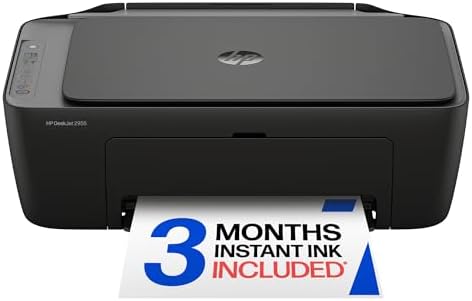
HP DeskJet 2955 All-in-One Printer – Black
The HP DeskJet 2955 All-in-One Printer (affiliate link) is another home-focused model that combines printing, scanning, and copying.
HP Canada currently lists the DeskJet 2955 as an all-in-one colour printer with print, copy, and scan capabilities. Its Canadian listing identifies it as AI-capable and compatible with HP’s Instant Ink program. HP’s current Canadian promotion has shown the model at a discounted price, making it possible to fall below the CAD $50 target during a sale.
Description
Like the DeskJet 2923, the 2955 (affiliate link) is intended for everyday home use rather than demanding commercial printing.
HP’s specifications list printing, scanning, and copying, with black print speeds of up to 7.5 pages per minute. It uses two cartridges—one black and one tri-colour—and has a 60-sheet input tray and 25-sheet output tray.
The printer also has built-in dual-band Wi-Fi and USB connectivity, providing flexibility for home users.
- 70% recycled plastic content contributes to environmental sustainability
- All-in-one printer for printing, scanning, and copying, includes setup cartridges, power cord, guides, supports mobile p…
- Compatible with HP 68 and HP 68e EvoMore Original Ink cartridges
(affiliate link)
Main Features
The DeskJet 2955 includes:
- Print, scan, and copy functions.
- Colour inkjet printing.
- Dual-band Wi-Fi.
- USB connectivity.
- Flatbed scanning.
- Up to 1,200 dpi optical scanning.
- Mobile printing support.
- 60-sheet input tray.
- 25-sheet output tray.
- Manual duplex printing.
- Support for standard and specialty inkjet paper.
- HP Instant Ink eligibility.
- Icon-based LCD display.
- One-year limited manufacturer’s warranty, subject to applicable regional terms.
HP specifies up to 1,200 × 1,200 rendered dpi for black printing and up to 4,800 × 1,200 optimized colour dpi under specified conditions.
Recommended Printing Volume
The DeskJet 2955 is intended for relatively light home printing. HP recommends approximately 50 to 100 pages per month for optimum performance.
This makes sense for a household that prints school assignments, occasional forms, letters, recipes, shipping labels, and other everyday documents.
If you regularly print several hundred pages every month, it may be better to consider a printer designed for higher-volume use, such as a laser printer or an ink-tank model.
HP DeskJet 2923 vs. HP DeskJet 2955: Which One Should You Choose?
Both models are designed around the same basic concept: affordable home printing with print, scan, and copy functionality.
Choose the HP DeskJet 2923 if:
The DeskJet 2923 (affiliate link) is the better choice if your priority is getting a very inexpensive wireless all-in-one printer for occasional household use.
It is particularly appealing if you find the B18JWA package around CAD $50 and want the advertised six-month Instant Ink trial.
For students and families who mainly need to print homework, forms, occasional colour documents, and simple household paperwork, the 2923 provides the core features needed without requiring a large investment.
Choose the HP DeskJet 2955 if:
The DeskJet 2955 (affiliate link)makes more sense if you prefer the newer model and find it at a similar promotional price.
Its dual-band Wi-Fi and current HP support make it an attractive option for a household that wants a newer home printer.
HP Canada’s current listing also shows the 2955 as a model aimed at home users, with print, scan, and copy functions and a recommended volume of up to 100 pages per month.
Which Is Better Overall?
If both printers are available for approximately the same price, I would lean toward the HP DeskJet 2955 (affiliate link) for someone buying new and wanting the newer model.
However, the HP DeskJet 2923 (affiliate link) can be the better bargain when it is significantly cheaper or when the particular package includes a more attractive promotional ink offer.
The most important thing is not simply the model number. Check the final Canadian price, included cartridges, Instant Ink terms, warranty, and availability before purchasing.
Can a $50 Printer Really Save Money?
Yes—but only if you use it sensibly.
The biggest savings come from avoiding repeated per-page printing charges and unnecessary trips to a print shop.
Imagine that your family regularly needs to print forms, school materials, labels, and other documents. Instead of travelling somewhere every time a document needs to be printed, you can handle many of these jobs at home.
However, ink costs must be considered.
An inexpensive inkjet printer is inexpensive to purchase, but ink cartridges are consumable products. If you print frequently, your long-term cost can become considerably higher than the initial printer price.
For that reason, these inexpensive DeskJet models are best for light or moderate household printing, rather than high-volume printing.
If you know that your household will print hundreds of pages every month, consider spending more initially on a printer with a lower ongoing cost per page.
Practical Ways to Save Money With a Home Printer
To get the most value from an affordable home printer, use it carefully.
Print only what you actually need. When possible, use black-and-white printing for ordinary documents instead of colour.
Use duplex printing when appropriate. The DeskJet 2923 and 2955 support manual duplex printing, so you can print on both sides by following the printer or software instructions.
Choose standard paper for everyday documents and reserve premium photo paper for photographs or projects where it is actually necessary.
Also, monitor your ink usage. If you print only occasionally, a subscription plan may not necessarily be the best long-term choice. Compare the cost of the subscription with your actual printing needs before continuing after a promotional period.
Frequently Asked Questions
Q: Is the HP DeskJet 2923 good for home use?
Ans: Yes. The DeskJet 2923 is designed for home users and combines printing, scanning, and copying in one machine. Its wireless connectivity makes it particularly convenient for families using multiple computers and mobile devices.
Q: Is the HP DeskJet 2955 good for students?
Ans: Yes. Its print, scan, and copy functions make it useful for students who need to print assignments, worksheets, research materials, and forms. However, students who print very large volumes should consider a higher-volume printer.
Q: Can these printers print from a phone?
Ans: Yes. Both models support mobile printing technologies through HP’s software and compatible mobile-printing services.
Q: Can the HP DeskJet 2923 scan documents?
Ans: Yes. It has a flatbed scanner with optical scanning resolution of up to 1,200 dpi.
Q: Can the HP DeskJet 2955 scan and copy?
Ans: Yes. The DeskJet 2955 is an all-in-one model offering printing, scanning, and copying.
Q: Are these printers suitable for heavy printing?
Ans: No. HP recommends approximately 50–100 pages per month for these models. They are better suited to ordinary household printing than high-volume office work.
Q: Do they print in colour?
Ans: Yes. Both are colour inkjet all-in-one printers.
Q: Do they have automatic double-sided printing?
Ans: No. HP specifies manual duplex printing for these models. This means the user may need to follow the software/printer instructions to print on both sides of the paper.
Q: Which printer is better: HP DeskJet 2923 or 2955?
Ans: For a buyer who finds both at approximately the same price, the DeskJet 2955 is the more attractive newer choice. However, the DeskJet 2923 can offer excellent value if it is substantially cheaper or if its particular package includes a more attractive ink promotion.
Q: Is a $50 printer enough for a Canadian family?
Ans: For light home printing, yes. A printer around CAD $50 can be sufficient for forms, school assignments, occasional colour documents, scanning, copying, and everyday paperwork. It may not be appropriate for a family that prints hundreds of pages every month.
Final Verdict
Having a printer at home can be a practical way for Canadian households to save time and reduce repeated small printing expenses. It can be especially valuable for families with school-age children, students, remote workers, and anyone who frequently handles paperwork.
The HP DeskJet 2923 Wireless All-in-One Color Inkjet Printer (B18JWA) (affiliate link) is an appealing budget option for people who want wireless printing, scanning, and copying at a low purchase price. Its six-month Instant Ink trial can also be attractive, provided buyers understand the terms of the promotion.
The HP DeskJet 2955 All-in-One Printer (affiliate link) is the stronger choice if you want a newer model and find it on sale around the same price. It offers the essential home-printing functions, dual-band Wi-Fi, mobile-printing compatibility, scanning and copying.
Ultimately, the right choice depends on how much you print. For occasional home use, either model can be a convenient and affordable solution. If your household prints heavily, however, it is worth looking beyond the initial CAD $50 purchase price and considering ink costs and a printer designed for higher-volume printing.